Posts

Want to Ditch the Day Job and Chart Your Own Course? Dive into the World of Online Income!

Image
The traditional 9-to-5 grind might feel like a hamster wheel you can't escape, but what if there was a way to break free and build a life fueled by passion and financial independence? Welcome to the thrilling world of online income! Here, you're the captain of your own ship, navigating the seas of opportunity to create a revenue stream that fits your dreams and skills. Whether you're a creative soul, a tech aficionado, or a marketing mastermind, there's a corner of the online world waiting to be explored and conquered. But navigating these uncharted waters alone can be daunting. That's where our " Make Money Online " blog comes in! Think of it as your trusty treasure map, packed with actionable tips, insightful guides, and real-life success stories to guide you on your quest for financial freedom. Ready to set sail? Here's a glimpse of the riches awaiting you: Unveiling the Secrets of High-Paying Affiliate Marketing : Dive into the lucrative world of a...
Problems with java and javac commands? Do the following

Image
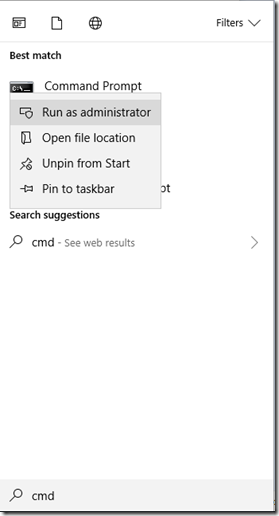
This is a branch from the usual discussion about java. You don’t really need this if you didn’t have any errors when executing the java –version and javac –version commands in the last post . You probably also don’t need it if you’re using an IDE since the commands are run internally for you. Now, let’s start sorting things out. The windows command prompt has inbuilt commands. You can also run other executables from the command line as long as the command prompt knows where to find the executables. In order to find the executables, it searches the current directory in which you are and also the path (which is just a list of directories you specify). If the javac –version command doesn’t run, it is likely you have not included it in your path. Let’s do that now. Even though I strongly advise you to do this yourself by following either method 1 or 2, I have included a small utility written in python to search for your java installation and add it to the path for you. You can find thi...

My Java Journey–Installing the necessary software

Image
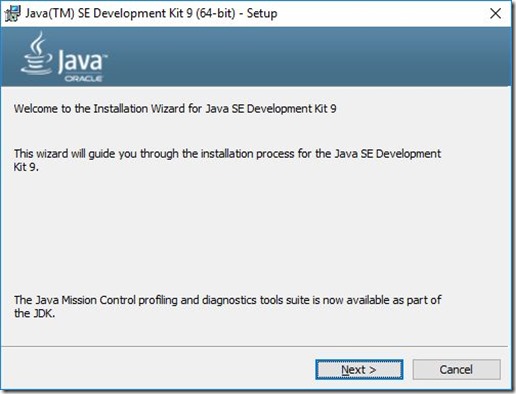
This is part of the series of posts on My Java Journey. In order to follow the discussions, please do well to read the previous post before proceeding to this one. If you haven’t read any of the posts, I encourage you to start here . Before we begin some real work, we have to make sure all necessary software are properly installed and configured. I’ll take you through the installation of the Java Development Kit (JDK 9) and Eclipse IDE on Windows. Unfortunately, I will not cover installation on Mac or Linux. I will however provide some links below the post that will guide the users of Mac or Linux to install the necessary software. Installing the JDK (6 minutes) If you haven’t downloaded the JDK already (I wonder what you’re waiting for), go ahead and download it from here . Below are the screens you will see during the installation process. I advise you keep the default settings unless you know what you are doing. 1. Launch the installer and press yes when prompted for use...

My Java Journey - What you need

Image
Welcome to the third post in this series of posts that attempts to introduce the beginner to programming using Java. Before you get started, I hope you have read the previous write-up about what Java is . Any way, I have some Good news - Everything you need to write programs in Java can be obtained free online. Text Editor You will need a text editor to type the instructions that the computer will execute as your program. These instructions that you type are called your source code . The text editor you need here must be a plain text editor. In other words, it should not be able to add text formatting like bolding, italicizing and underlining. On a windows machine, you can use notepad. It is not advisable to use rich text editors like Wordpad, MS Word, Text Edit(Mac), etc. If it becomes crucial to your health that you should use one of those, please remember not to format the text and save it as plain text. There are however some specialised text editors that make programming ...

My Java Journey - What is Java?

This is the second post from a series of posts about my personal journey with Java. If you haven’t read the first post and the disclaimer , you can do that now. See how people use different languages in speaking with each other? Well, Java is a language that computers speak among many other languages. This is not entirely true. If you could hear two computers speaking, you will probably hear something like 01001000 01100101 01101100 01101100 01101111 … – just a series of zeroes and ones - and that won’t make lots of sense. This series of zeroes and ones is known as binary . Humans need to be able to speak in this way in order to speak to or instruct computers to perform tasks (programming). Due to the difficulty in this, other computer languages were developed that closely resemble human language. Java is just one example of such a language. Others are C++, C, Python, Perl, Ruby, Ada, JavaScript and PHP. Hundreds of programming languages exist. Normally, computers will not be abl...

My Java Journey – Intro

Image
This is a series of posts which will attempt to introduce my cherished readers to the Java programming language. I started learning java a couple of years ago. Although it wasn’t easy at first, I think it was worth it. Duke Disclaimer : I am no expert at Java or any other programming language and therefore not remotely an authority in those regards. Actually I’m a nutritionist. Seriously. All I will be saying in this series of posts are from my thick head and from things I have read during my Java journey. Advice : Eat fresh and neatly washed fruits and vegetables, drink loads of water, otherwise, you’ll start writing crazy stuff like I am doing now. The first time I saw a computer was when I was 13 years (I’m from that part of the world ), and gosh, it was love at first sight. I was mostly fascinated about that little arrow (which I later heard was called a cursor) that moved on a screen according to the movement of a small device on the table. I got hooked. I enro...

Status Grabber

Image
A feature was recently introduced into WhatsApp which allows your contacts to upload images and videos as status messages. These images and videos automatically disappear after 24 hours. The only way you could see them again is if the uploader re-uploads it or sends it to you. Status Grabber is an app which automatically saves all the lovely statuses that you view in WhatsApp. This allows you to watch them at any time you want. You can perform many actions actions with this images and videos that are saved with this app including using them as your WhatsApp profile or background picture, contact photo, etc.

Ewe Catholic Hymnal (Dziƒomɔ)

Image
  It's time to sing praises to the Lord. Sing praises to the Lord, who dwells in Zion, Declare among the people His deeds. Psalms 9:11 Download the app from the Google Play Store  This brought me to design a new app with hymns and prayers. The hymns are taken from the Ewe Catholic Hymnal, Dziƒomɔ. This app contains all the hymns (including the latin hymns) in the Dziƒomɔ , the hymnal and prayer book for catholics who speak the Ewe language. It also contains some prayers from the Dziƒomɔ . The app hopes to cater for people without the hymn book or who will prefer to use their smart phones for searching hymns rather than the hymnal since the app has greater flexibility of use compared to the hard copy of the hymn and prayer book. Some of the features included in the app are listed below.

SA File Sharer - Say goodbye to file size limits

Image
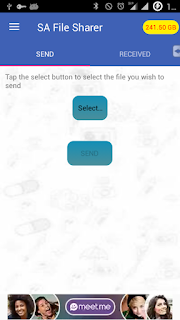
Introducing the new SA File Sharer . This app was developed to make file sharing easier through the most used instant messaging application, WhatsApp. Due to the limitations on the sizes of files that can be sent through WhatsApp, SA file sharer imposed those limitations on its users. Main Screen Finally, the days for those limitations are over. Users can now share Gigabytes of data if they want to. How? Its simple. The latest version of SA File Sharer breaks your files into multiple pieces which it then sends to the recipient(s). At the recipient's side, the files are rejoined together into the original form.  One other limitation posed by the instant messaging app is that, you can send only ten media at a time. For this, SA File Sharer sends files larger than 1GB in groups of 10 chunks each.  Send Huge Files with SA File Sharer To avoid misuse (and earn some coins :) as well), Users only have a default of 300MB to share. Sad right?, Wrong. Users have t...

Whatsapp file sharer becomes SA File Sharer

Image
Your favourite app, Whatsapp file sharer, an app which enables you to send files easily and quickly to others on your WhatsApp instant messenger contact list is no longer on play store. This is due to the fact that, it did violate a trademark right of WhatsApp Inc in its use of the name WhatsApp. Worse was that, the app icon clearly resembled that of WhatsApp. The updated version of the app, SA File Sharer , has been uploaded to play store. Please install it. It will help you uninstall the previous version if it is still installed on your device. For more information, contact me . NEW SA File Sharer

How to use the WhatsApp File Sharer app

The WhatsApp file sharer app  enables you to share any type of file via WhatsApp. The following is a short information on how to make the best use of it. After installation, launch the app there are two tabs, the SEND and RECEIVE tabs to send a file, you should use the send tabs the files you receive show up in the received tabs SENDING A FILE 1. Launch the app and swipe to the SEND tab if it doesn't already open 2. Tap on the SELECT button. This opens up a file browser from which you select the file you wish to send 3. Tap the SEND button. WhatsApp is automatically launched 4. Select the contact or group you wish to send the file to and tap send RECEIVING A FILE 1. Launch the app and swipe to the RECEIVED tab 2. The file shows there with the WhatsApp-assigned file name. All files already extracted show up with a green tick, otherwise, it comes with a red cross 3. To recheck for new files, over-swipe down or click the REFRESH icon on the action bar. 4. Tap on the...

WhatsApp File Sharer

Image
Have you ever wanted to share an android or windows program with a friend who is not around you? Or have you ever wanted to send a file which is too large to be sent by E-mail and is unsupported by most file sharing apps, Never worry, your remedy is here The new WhatsApp File Sharer allows you to send any type of file through WhatsApp. Yes, any type of file. It embeds the file into a PDF document and sends it to any user or group you select. Once the file is sent, a notification is received and the file can be extracted. It is a very simple way of sending files directly through WhatsApp. Good part is, you can send videos, audios and images which are larger than the default WhatsApp limit of 16MB.

How to hack Windows 7 Administrator Account

Disclaimer: You can't blame a drunk for spilling out rubbish, can you? Use at your own peril. ;)   There are times when you forget your password and cannot access your windows 7 system, or you need to install a software but you do not have the right privileges to do so. Maybe you just need to prove to your friends that you are the greatest hacker of all time, or you are absolutely up to no good and feel like hacking into a windows 7 machine. Here's how:

Boot a PC From Live CD or Live Pen Drive

At times, it becomes necessary to boot your computer from a pen drive or compact disc. This may happen when you need to recover files, test an operating system without installation or tweak some system files. Hackers may also access your computer files without your knowledge by using a bootable media other than your hard drive to access them. In this way, they avoid most security features you may have set using your operating system. Some of my favourite methods of booting from a pen drive or CD are listed below:

[FIX] Bluestacks Error–Your Graphics Driver Seems to be Out of Date…

Image
Recently, i tried installing Bluestacks Android App player on my Dell PC. Although the installation was successful, i got the error: Your graphics driver seems to be out-of-date. Bluestacks requires updated drivers to run. Update now? I was quite alarmed because i had already updated my drivers from the Dell Website. Bluestacks however downloaded some drivers for me and those couldn’t install on my machine. Updating from Device Manager didn’t worked either. I was only told i had the best driver for my device.

E-Franchise is Born

Image
After all this while, the Electronic Voting software i had been developing is now ready for testing. I was able to implement a couple of other vote types. I made one that would take care of cases in which you have options and the user would have to rate them in the order of preference. This is made typically to cater for cases when you might want to see the opinion of the user on which product is the most preferred or the least preferred. In E-Franchise, i dubbed this Scale of Preference .

Electronic Voting Application

Hey guys, I thought about the problems that usually crop up in paper voting and decided to implement the voting system in software. The project is ongoing but i would also like to know what functionality you would expect in your ideal electronic voting software. Currently, the program runs the kind of voting where people stand for a particular office and one person is voted by the voters for each office (An Election ). I hopes to implements other vote kinds later. In the mean time, you can send your suggestions as to what to add or remove to make it an ideal program.

Free Word Search Puzzle App

Image
Hey, i had some spare time during this weekend and decided to write an application. I settled down with a small puzzle. I wrote a word search puzzle with not too pretty an interface but i think its worth trying out. The interface is however customizable by either changing the look and feel, setting an image background or a color background, etc. The main Interface

Meet the command prompt - The title command

Image
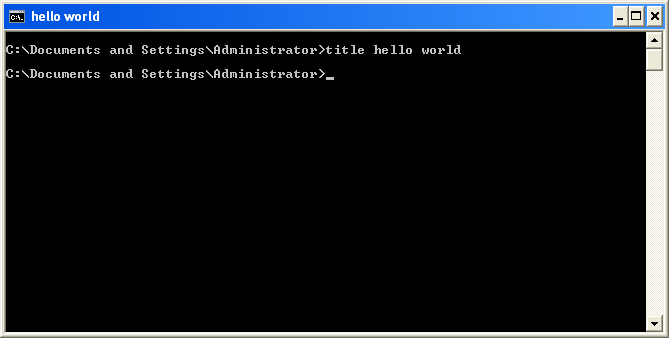
Want one of the easiest command s to ever be used in the command prompt? Here it comes. The title command is very simple to use. It takes the synt ax title . For example, i could type title format my pen drive . All this command does is to change the ti tle of the command prompt window in the current execution. You might want to use this command when you have different command prompt windows open and would like to eas ily identify them with their titles. The title command W hen you open the command prompt window, it is given a title automatically. using th is might save you time s earching through all open windows to find the one you were using to change you r user account information for instance.  

I just love computers

Image
At times, i am tempted to say i love computers even more than human beings because computers tend to treat us better than our fellow humans. For instance, try booting a fellow human and you will get a dirty slap in the minimum, but boot a computer and it will gladly tell you......