Posts

Free Word Search Puzzle App

Image
Hey, i had some spare time during this weekend and decided to write an application. I settled down with a small puzzle. I wrote a word search puzzle with not too pretty an interface but i think its worth trying out. The interface is however customizable by either changing the look and feel, setting an image background or a color background, etc. The main Interface
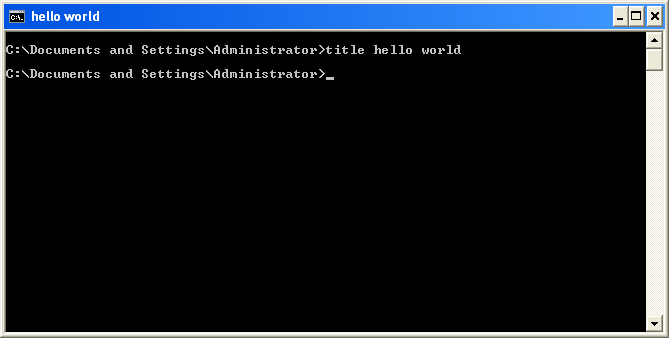
Meet the command prompt - The title command

Image
Want one of the easiest command s to ever be used in the command prompt? Here it comes. The title command is very simple to use. It takes the synt ax title . For example, i could type title format my pen drive . All this command does is to change the ti tle of the command prompt window in the current execution. You might want to use this command when you have different command prompt windows open and would like to eas ily identify them with their titles. The title command W hen you open the command prompt window, it is given a title automatically. using th is might save you time s earching through all open windows to find the one you were using to change you r user account information for instance.  

I just love computers

Image
At times, i am tempted to say i love computers even more than human beings because computers tend to treat us better than our fellow humans. For instance, try booting a fellow human and you will get a dirty slap in the minimum, but boot a computer and it will gladly tell you......

Want a post written on a selected topic? Suggest it.

Hey peeps!!! I kind of feel like pleasing someone. So i give the opportunity for anyone to write a topic on which they want me to write a post. If the topic is computer related and i can get enough information, i will write on it within the shortest possible time. You can either put the topics in the comment field below or contact me with your topics. Always remember that, anyone who will like to contribute a post on this site is always welcome, as long as it is a computer related post.

Meet The Command Prompt - The Date Command

Image
This is a fairly simple command to use. The date command simply displays the current date. When this command is run without arguments, It first displays the current date, then prompts for a new date to be entered. You can simply press enter to keep the current date. When you don't want to be prompted for a new date, you can use the /t switch. This switch when used will simply display the current date

Meet the command prompt - The CD command

When working in the windows command interpreter, there is always a current working directory. This is the directory that is shown at the prompt. In the screenshot below, the current directory is D:\Windows\system32. When a command is run with no arguments, it simply displays the current directory path. Open the command prompt and simply type cd . You will see you current working directory displayed. The CD command takes a path argument when you want to change the working directory. For example, to change the current working directory to the windows temporary directory, you can type something like  cd %temp%  or cd D:\Users\Staphy\AppData\Local\Temp (depends on your operating system)

Meet the command prompt - the REN command

The RENAME command can be used instead of this command - they do the same thing. What they do (as the names suggest) is to rename a file. It takes two arguments; the file to be renamed and the new name to be given to the file. It takes the form ren file1 file2. Here, file1 is the path to the file to be renamed. file2 is the new name to be given to the file. After this command is executed successfully, there file specified by file1 no longer exists. If the file existed before, its name will be changed to file2. Note however that, the file name includes the extension.